
Monday, November 19, 2007
An International Zune User's Guide (Updated)
Posted by Jason Dunn in "Zune Talk" @ 08:00 AM
This article has been updated as of April 2010 to include information on the Zune HD.
The world is a big place, full of people who love gadgets. When a company decides to release a piece of technology in a single country rather than a world-wide release, it never stops determined people from getting the technology. Like a modern-day Robin Hood, eBay is the primary conduit for re-distributing technology marvels from the "haves" to the "have-nots" (profit for the eBay seller is the motive, however). The Zune HD is one such product, released only in the US of A so far. I happen to live in Canada, and can't buy the Zune in my country, or use much of the online functionality - not without a little creativity that is. Welcome to the International Zune User's Guide: everything you need to know about being one of those clandestine folks acquiring and using a Zune HD in a country where Microsoft doesn't officially support you. Everything in this article is from the perspective of someone who lives in Canada, so there may be slight variations depending on where you are in the world.

Purchasing the Product
So you want to buy that shiny new Zune HD, only no retailer or online store in your country carries it. This is probably one of the easier problems to solve: find someone that will ship it to your country. The #1 place to look is eBay, because private sellers are often willing to ship elsewhere in the world in return for a healthy profit. This means you should expect to pay more than retail once all of the final shipping charges are calculated. If you live in Canada like I do, you're in luck: many US-based sellers will ship to Canada. Be wary of inflated shipping charges, though that's likely going to be the price you'll pay for getting it to you. Unfortunately I've seen many Zune HD ads where the seller will not ship outside North America: you'll have to search for sellers that are willing to ship to Canada/Europe/Asia/etc.
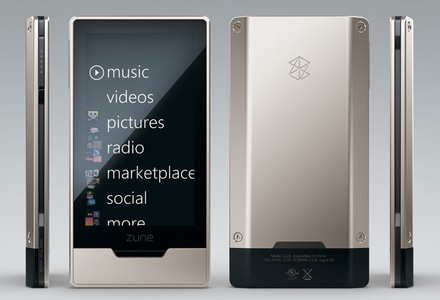
Figure 1: Mmm...the tasty Zune HD that Microsoft doesn't want you to buy.
Also be prepared to pay some sort of duty/import tax depending on where you live. If you happen to know someone who lives in the USA, this is the far better route: get them to buy if for you at retail, and ship it to you. You'll get the cheapest possible price overall, and your friend can mark the package with a lower-than-retail price. In Canada, if a product comes in via courier (UPS, FedEx, etc.) and the value is less than $20 CND, there's no brokerage fee. If the value is equal to $20 CND, the brokerage fees start at around $25 and go up from there. Have your friend mark the product as a "not for resale product sample", put a value of $10 on it, and you should be able to receive it without paying anything extra. If the product comes into Canada via the USPS (United States Postal Service), there are no brokerage fees regardless of the price listed: you'll just be paying GST and likely a $5 processing fee.
Zune Marketplace
OK, so you've got the hardware: now what? The Zune HD works great with all the music and content you have on your hard drive, but one of the strengths of the Zune HD(and the iPod for that matter) is that you can access huge online catalogs of music. The problem is, you can't buy those tracks if you live outside the USA. You can't even see the Marketplace tab in the software if your location is set to anything other than USA! It took me a lot of trial and error to figure this out, but I've figured it all out so you don't have to. If you have a Microsoft Passport account (Windows Live ID) associated with an Xbox Live account, it will have your credit card billing profile. You won't be able to use this account with the Zune Marketplace because the Zune Marketplace blocks purchases from credit cards that have non-US billing addresses. Every time I've tried I get an error stating that "Your credit card information is not valid. Please verify and try again." No amount if re-trying will get it accepted in my experience.
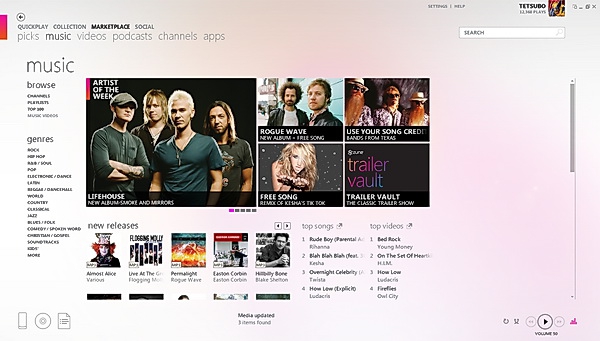
Figure 2: The Zune Marketplace that Microsoft doesn't want you to see or use.
The points you might have in your Xbox Live account won't be accessible to you in the Zune Marketplace - in fact, with the new Zune software when I tried to sign in with my "real" Passport account (the one associated with my Xbox Live account) it wouldn't even allow me to sign in, claiming that the "Zune Marketplace was unavailable". As you can tell, the Zune team has done almost everything in their power to block non-US based Zune owners from accessing Zune marketplace content. But where there's a will, there's a way. Follow these steps to get to near-Zune Marketplace bliss:
- Go to Passport.com and register a new Windows Live ID. Use any email address you want. When you're creating your profile, select your home country as the United States of America. Use any US address you want: if you have a sense of irony, use 1 Microsoft Way, Redmond, WA, 98052.
- You now have a "clean" Windows Live ID without associated credit card information that can be used in the Zune Marketplace - but you need points to do that. And, not surprisingly, you can't purchase points with a non-US credit card. What you need are Xbox Live Points Cards that are sold in the US. Point cards purchased in other countries are geographically linked to that country and are not compatible with the Zune Marketplace. You have two choices at this point: head over to eBay and purchase point cards from a US-based seller (you may want to confirm there are US-based points). The nice thing here is that many sellers will just email you the point codes, meaning they don't care if you're in Poland or the UK. Or, use that friend in the USA again to buy you a points card.
- Once you have the point card codes, open the Zune desktop software and log in with your new Windows Live ID. The software may complain about your location setting for your Windows Live ID not matching the location setting on your computer (see below). You'll need to exit the Zune software, go to your Control Panel > Region and Language > Location, and change the location to United States. Open the Zune desktop software and log back in.
- Go into Settings > Account > Redeem Code.
- Enter in the Xbox Live Points code(s) you have. Those points will be added to your account.
- Now giggle like a school-girl as you witness your account fill with points ready for spending. You can use these points to purchase music or music videos from the Zune marketplace, and they'll download and play back on your Zune without any problem.
- When you need more points, just repeat steps #2 through #5 again. If you're planning on buying a lot of music, you should probably purchase a few blocks of 4000 points (which cost around $60 USD at retail).
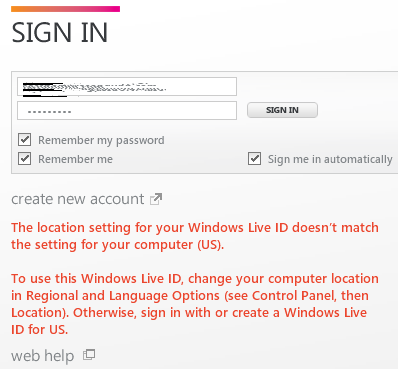
Figure 3: The error screen you'll see if your computer location doesn't match the Live ID location.