
Tuesday, November 20, 2007
Dynamic Search Still Exists in Zune Desktop Software
Posted by Jason Dunn in "Zune Software" @ 05:00 PM
The Zune desktop software continues to disappoint me, but I've been reading other blogs and reviews stating that the dynamic search is gone from the Zune software. This is the feature where you'd click in the search box, start typing, and it would filter down your content until you found what you were looking for. This feature came from the Windows Media Player 11 code base, so most of you are probably familiar with how it works. In the new Zune software, when you click in the search box and start typing, nothing happens until you hit enter - then you see a really great summary of your search results: artist results, song results, and even Zune Marketplace results.
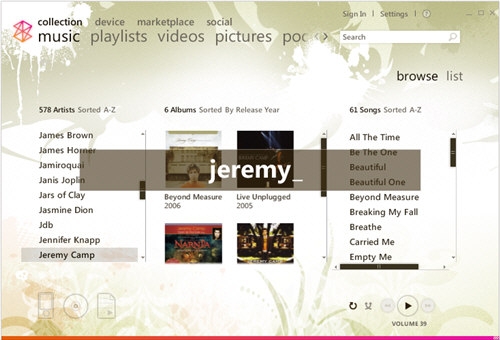
But guess what? If you just start typing, without clicking up into the search box, you'll get a dynamic search! Check out the screenshot below for an example: I just started typing, and as I typed it superimposed the characters I was typing on the screen and did the search. When I stopped typing the superimposed text vanished and my results were waiting for me.
Like the Now Playing function, this is pretty much entirely undiscoverable - you might only figure it out by chance (which is how I found it). But now that you know, enjoy it!
But guess what? If you just start typing, without clicking up into the search box, you'll get a dynamic search! Check out the screenshot below for an example: I just started typing, and as I typed it superimposed the characters I was typing on the screen and did the search. When I stopped typing the superimposed text vanished and my results were waiting for me.
Like the Now Playing function, this is pretty much entirely undiscoverable - you might only figure it out by chance (which is how I found it). But now that you know, enjoy it!